Docs pages tend to be an afterthought — a wall of parameters and response examples you skim once and never revisit. Ours was no different. So I rebuilt the whole thing around a single idea: let people use the API before they commit to it.
What's New
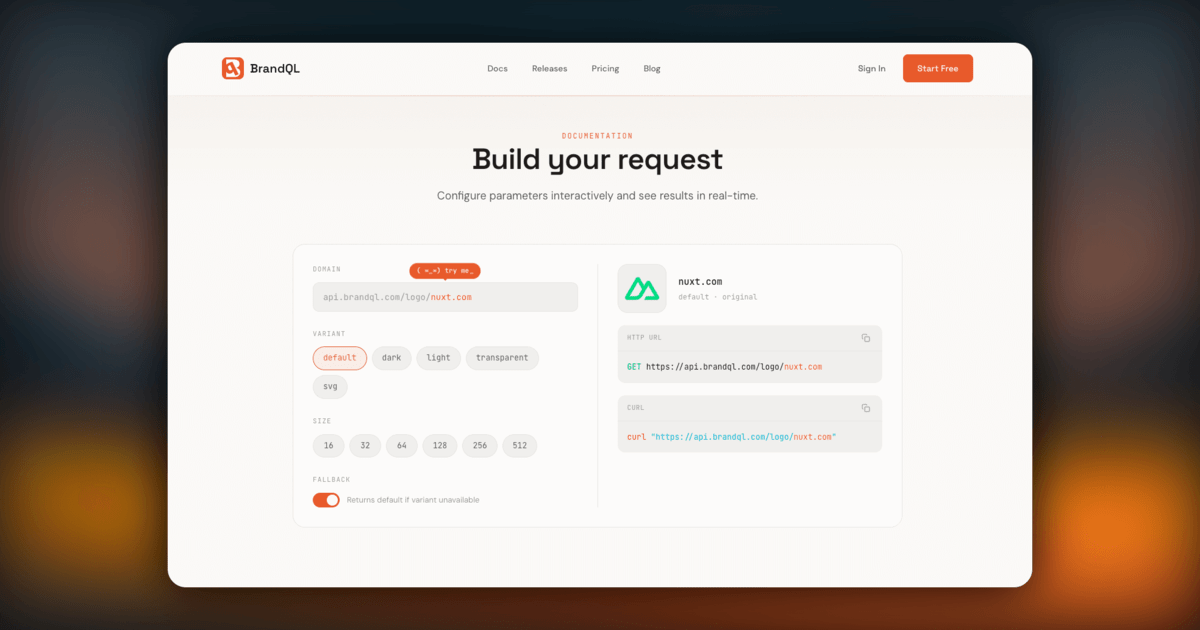
The docs page now opens with a full interactive request builder. No sign-up, no API key — just pick a domain and start playing.
- Live parameter controls: Toggle domain, variant, size, and fallback settings. The result updates as you go.
- Logo preview: See the actual logo render in real time, with contextual backgrounds that adapt to each variant.
- Copy-ready output: Grab the full HTTP URL or a curl command with one click. Paste it straight into your project.
- Try me: Hit the randomizer to cycle through curated domains — a quick way to see the range of what the API returns.
Why I Built It This Way
I kept running into the same thing: people would read the docs, then open a terminal to test the API separately. Two contexts, unnecessary friction. The request builder removes that gap. You read the param, you tweak it, you see what happens — all in the same place.
The best docs are the ones where you don't need to leave the page to understand what's going on. That was the goal.
Try It Out
Head over to the docs page and mess around with it. Full details on this release are in the changelog.
If something feels off or you have ideas for what to add next, reach out on X (@useBrandQL) — I read every message.